
Ask your AI about your money, and let it answer with your own figures
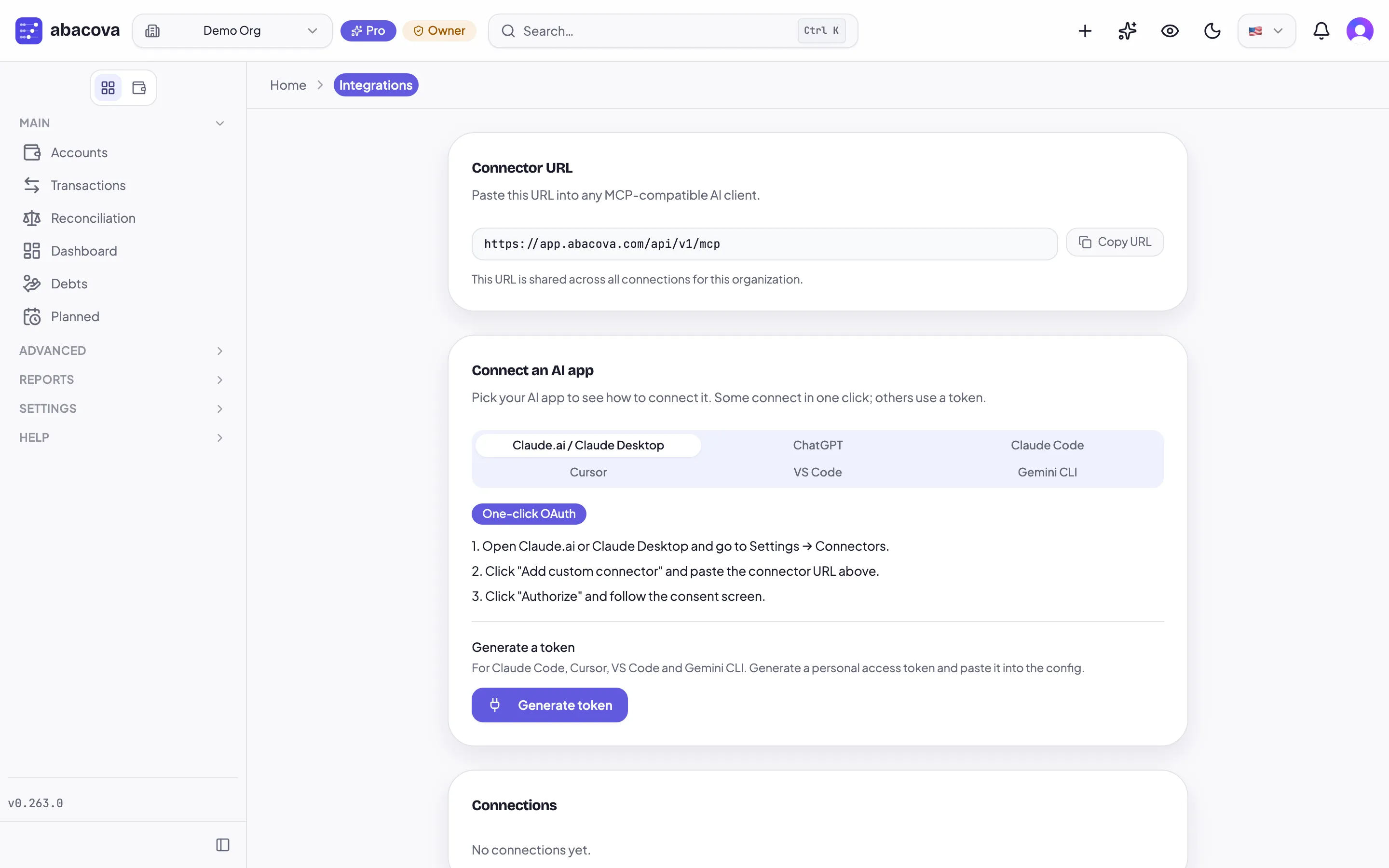
There is a big difference between asking an AI "how much should I spend on food?" and asking it "how much have I actually spent on food this quarter?"
Anything can answer the first. It's a general opinion shaped like advice. Nothing can answer the second without your data in front of it — and until now that meant exporting a CSV, pasting it into the chat, and hoping the model added it up correctly.
abacova's connector solves that from the other end. Instead of carrying your data to the AI by hand, you connect the AI app to your abacova organization, and it looks up what it needs, when it needs it, with your permission.
What it can answer
Once connected, the AI can read your balances and net worth, your transactions, your reports, your budgets, your debts between people, your planned payments, your cash-flow forecast and your period recap.
That turns things that used to be five clicks and some mental arithmetic into a single question:
- "How much did I spend on restaurants this quarter compared with last?"
- "Am I over budget in any category?"
- "Who owes me money, and since when?"
- "Do I make it to payday with the bills that are coming?"
The answer comes from your transactions, not from a national average.
Which apps, and how they connect
It works with Claude, ChatGPT, Claude Code, Cursor, VS Code and Gemini CLI.
Claude and ChatGPT connect by pasting the connector URL and approving: copy the URL from Settings → Integrations, paste it into the app as a custom connector, and approve the consent screen.
Claude Code, Cursor, VS Code and Gemini CLI use a personal access token you generate on the same screen. It is shown once, so you save it there and then.
The Integrations screen carries the steps for each app, and the website has a guide with screenshots.
Read-only, unless you decide otherwise
This is the part worth reading slowly, because it's where the control lives.
A connection starts read-only. It can look things up; it cannot touch anything. For it to change something you have to switch on Allow changes for that specific connection, and it ships off.
With changes allowed, the AI can do three things: set categories, add or remove tags, and record an ordinary income or expense. It cannot make transfers between accounts, split bills, debts, or delete anything. Those limits aren't a setting — they're the whole of what the connector knows how to do.
Every change appears in the Audit Log and counts towards your transaction allowance, exactly as if you had typed it yourself.
And you can revoke a connection whenever you like; it stops working immediately. You can have up to ten active at once.
An honest warning about changes
When you switch Allow changes on, most apps show you what they're about to do and ask you to confirm. Not all of them.
In our own testing, ChatGPT applied a change without asking. That isn't a fault in abacova or in ChatGPT: each app decides how much it checks before using a tool, and that behaviour can change over time.
The practical conclusion is simple. If you'd rather nothing is ever written, leave Allow changes off. That's how it ships, and reading touches nothing.
One detail that saves a confusing ten minutes: if you've just turned changes on, refresh the app's tool list (in Claude.ai: Settings → Connectors → the connector's ⋮ menu → Refresh tools list) and start a new chat. Until then the app is still working from the read-only list it fetched when it connected.
Where it lives
The connector is part of the Pro plan, under Settings → Integrations.
If you'd rather see it before touching it, there's a full lesson in the training section of the site, covering the connection step by step and the first questions worth asking: Use abacova from your AI assistant.
Why we built it this way
We could have added another chat inside the app. There already is one: abacova's assistant, which is strictly read-only and answers within the app.
But more and more people already have an assistant open all day, and that's where the questions occur to them. The odd thing was never the absence of a chat box — it was having to choose between the tool you work in and the data you need to answer.